Implementing Code Splitting and Lazy Loading in React
Learn how to implement Code Splitting and Lazy Loading in React and it's importance.
As Front End Engineers, we aim to deliver the best user experience and one of the ways to achieve that is by optimizing the applications' performance.
Users expect fast, responsive experiences, and will quickly abandon sites that are slow to load. Google's research found that 53% of mobile users abandon a page that takes more than 3 seconds to load. With the prevalent usage of mobile devices which can be on slower network speeds, optimizing performance is critical.
Code splitting and lazy loading are effective strategies to achieve great performance on the web. In this post, we’ll explore these techniques, their benefits, and how they can be implemented in React.
Introduction to Code Splitting and Lazy Loading
Code splitting breaks down your application into smaller chunks, loading only the necessary parts to reduce the bundle size. Lazy loading defers loading non-essential resources until they’re needed, further enhancing performance.
For example, consider a React app with a Login, Dashboard, and Listing page. Traditionally, the code for all these pages are bundled in a single JS file. This is suboptimal because when the user visits the Login page, it is unnecessary to load pages such as the Dashboard and Listing page. But with implementing code splitting and lazy loading, we can dynamically load specific components/pages only when needed, significantly improving performance.
In React, code splitting can be introduced via dynamic import(). Dynamic import is a built-in way to do this in JavaScript. The syntax looks like this:
import('./math').then((math) => {console.log(math.add(1, 2));});
For React apps, code splitting via dynamic imports works out of the box with modern toolchains like Vite, Next.js, and React Router. The React.lazy() function (introduced in React 16.6) lets you render a dynamic import as a regular component, splitting a large JS bundle into smaller chunks that load on demand.
If you're on a custom Webpack setup, refer to the Webpack guide for configuring code splitting.
Implementing in React
To implement lazy loading in React, we can leverage React.lazy function and the Suspense component to handle loading states. Here's an example demonstrating lazy loading in React:
const LazyComponent = React.lazy(() => import('./LazyComponent'));function App() {return (<React.Suspense fallback={<div>Loading...</div>}><LazyComponent /></React.Suspense>);}
By wrapping a lazy-loaded component with Suspense, we can provide a fallback/placeholder UI while the component is being loaded asynchronously, such as a spinner.
However, there can be a case where LazyComponent fails to load due to some reason like network failure. In that case, it needs to handle the error smoothly for a better user experience with Error Boundaries.
import MyErrorBoundary from './MyErrorBoundary';const LazyComponent = React.lazy(() => import('./LazyComponent'));function App() {return (<MyErrorBoundary><React.Suspense fallback={<div>Loading...</div>}><LazyComponent /></React.Suspense></MyErrorBoundary>);}
So, when the LazyComponent is lazily loaded, it signifies that the code for LazyComponent is segmented into a distinct JS chunk, separate from the main JS bundle. This JS chunk is exclusively loaded when the LazyComponent is required to be displayed on the user interface, optimizing the loading process and enhancing the application's performance.
Note: Since React 18, React.lazy and Suspense work on the server too via streaming SSR APIs (renderToPipeableStream for Node.js, renderToReadableStream for Edge). Frameworks like Next.js handle this for you. The third-party @loadable/component library was the pre-React-18 workaround and is rarely needed today.
From the above, we have seen how we use React.lazy to code split and lazy load components. But the question is where to lazy load and code split. There are approaches like Route-based code splitting and Component-based code splitting.
Route-based code splitting
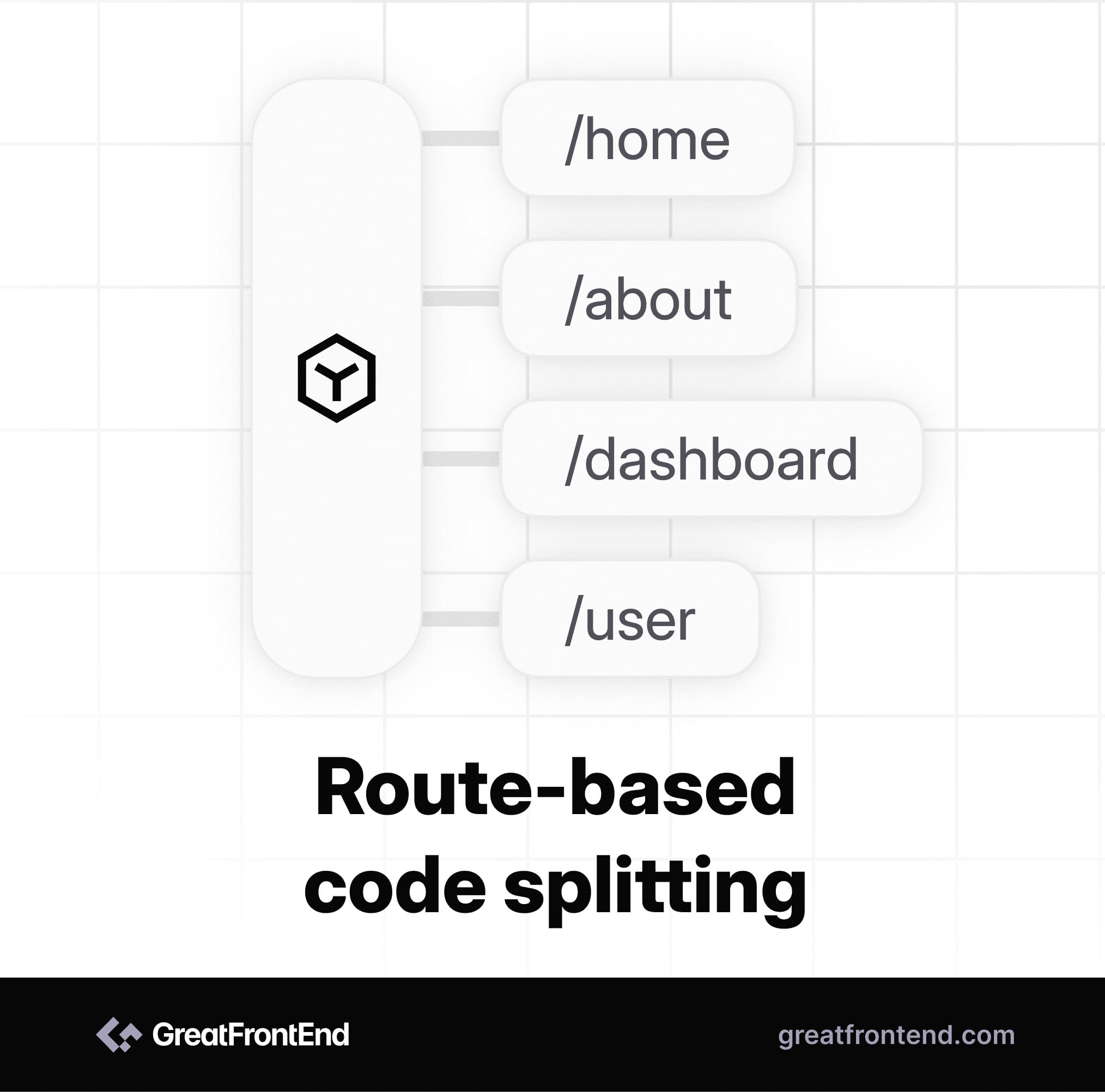
Route-based code splitting is almost always the best place to start. It typically gives the largest reduction in initial JS, since each route ends up as its own chunk and only the active one is loaded. Modern bundlers (Webpack 5, Vite/Rollup, Turbopack) automatically extract shared dependencies into common chunks, so you don't usually have to worry about duplication across routes. Just check your build output occasionally to confirm shared code lives in vendor chunks rather than being inlined into every route bundle.
Here is an example of route-based code splitting:
import { Suspense, lazy } from 'react';import { BrowserRouter as Router, Routes, Route } from 'react-router-dom';const Login = lazy(() => import('./Login'));const Dashboard = lazy(() => import('./Dashboard'));const App = () => (<Router><Suspense fallback={<div>Loading...</div>}><Routes><Route path="/" element={<Login />} /><Route path="/dashboard" element={<Dashboard />} /></Routes></Suspense></Router>);
Component-based code splitting

Component-based code splitting provides granular control over loading specific components, allowing for more precise optimization. The real power of code splitting comes into the picture in component-based code splitting where we have more control over granular components. When deciding which components to lazy load, consider the importance and impact of each component on the initial rendering and user experience. Ideal candidates for lazy loading are large components with significant code or resources, conditional components that are not always needed, and secondary or non-essential features. These can be segmented into separate chunks and loaded on demand, optimizing performance. However, critical components like headers, main content, and dependencies should be loaded upfront to ensure a seamless user experience. We need to be careful in selecting which components to lazy load to strike a balance between initial load times and providing essential functionality. Here is an example of component-based code splitting:
import { useState, lazy, Suspense } from 'react';const Modal = lazy(() => import('./Modal'));function App() {const [showModal, setShowModal] = useState(false);const openModal = () => {setShowModal(true);};const closeModal = () => {setShowModal(false);};return (<div><button onClick={openModal}>Open Modal</button>{showModal && (<Suspense fallback={<div>Loading Modal...</div>}><Modal onClose={closeModal} /></Suspense>)}</div>);}export default App;
In this example, the Modal component is lazily loaded using React.lazy() and dynamically imported. The modal is conditionally rendered based on the showModal state, which is toggled by the openModal and closeModal functions. The Suspense component displays a loading indicator while the modal component is being loaded asynchronously. This implementation optimizes performance by loading the modal component only when the user interacts with the Open Modal button, preventing unnecessary loading of heavy components like a text editor until they are actually needed.
Webpack magic comments
If you’re using Webpack to bundle your application, then you can use Webpack's magic comments to further improve the user experience with lazy loading.
We can use webpackPrefetch and webpackPreload for dynamic imports. In the above example of the lazy loading Modal, the Modal is loaded only when the user clicks the Open Modal button and the user has to wait for a fraction of a second to load the Modal.
We can improve the user experience by not making users wait for the Modal to load. So, in that scenario, we can prefetch or preload the Modal component. In the above example of the Lazy loading modal, the only difference will be in how we import the Modal component.
Before:
const Modal = lazy(() => import('./Modal'));
After:
const Modal = lazy(() => import(/* webpackPrefetch: true */ './Modal'));
What webpackPrefetch: true does is that it tells the browser to automatically load this component into the browser cache so it's ready ahead of time and the user won’t have to wait for the Modal component to load when the user clicks on the Open Modal button.
We can use webpackPrefetch and webpackPreload for a particular component when we think that there is a high possibility for the user to use that component when a user visits the app.
Note that magic comments are Webpack-specific. Vite (Rollup) and Turbopack don't honor them. If you're on Next.js, route chunks are prefetched automatically by <Link>, but next/dynamic itself has no prefetch option, so for high-probability interactions you typically trigger the dynamic import() yourself on hover or focus. On Vite, you can use <link rel="prefetch"> directly or a plugin like vite-plugin-preload.
Suspense beyond React.lazy
For a long time, Suspense was mostly known as the fallback for React.lazy. Two newer features extend what it can do: streaming SSR (added in React 18) and the use() hook (added in React 19). Both work with the same Suspense boundaries you already place for lazy loading, so a single boundary can show a fallback while a chunk downloads, while data resolves, and while the server streams the rest of the tree.
The use() hook with Suspense
The use() hook lets a component unwrap a promise (or read context). React suspends the component until the promise resolves, so you don't need a useEffect or a manual loading state. It works in both server and client components, but the most common pattern is unwrapping a promise in a client component.
'use client';import { use, Suspense } from 'react';import ErrorBoundary from './ErrorBoundary';function Profile({ userPromise }) {// React suspends here until userPromise resolves.const user = use(userPromise);return <h1>Hello, {user.name}</h1>;}export default function ProfilePage({ userPromise }) {return (<ErrorBoundary fallback={<p>Failed to load profile</p>}><Suspense fallback={<p>Loading...</p>}><Profile userPromise={userPromise} /></Suspense></ErrorBoundary>);}
The typical pattern is to start the fetch in a server component (or route loader), pass the unresolved promise down to a client component, and let use() handle the suspending. The request is in-flight before the client component renders, so the user sees the resolved UI sooner than if the client had to fetch on mount.
Streaming SSR with Suspense
Streaming SSR with Suspense has been available since React 18, via renderToPipeableStream (Node.js) or renderToReadableStream (Edge). When a Suspense boundary suspends on the server, the server doesn't block. It sends the fallback HTML immediately and streams the resolved content as soon as it's ready. This is how Next.js App Router's loading.tsx works.
For code splitting, a route-level Suspense boundary lets the server flush the shell, navigation, and skeleton early, then stream in the lazy-loaded sections as their chunks resolve. First Contentful Paint (FCP) usually improves as a result.
React Server Components and React.lazy
React Server Components (RSC) change which components even need code splitting. Server Components run only on the server and are never sent as JavaScript to the browser, so they don't add to the client bundle. You can't (and shouldn't) wrap them in React.lazy.
A short reference for what to split:
| Component type | Ships JS to browser? | Use React.lazy? |
|---|---|---|
| Server Component (default in App Router) | No | No, it's already not in the bundle |
Client Component ('use client') used everywhere | Yes | Optional, split when it's heavy or below-the-fold |
| Client Component used conditionally (modal, chart, editor) | Yes | Yes, high-impact split |
| Route component | Yes (the route's bundle) | The router handles this for you in App Router |
The Next.js App Router does route-based splitting automatically. Every page.tsx is its own bundle, so you only need explicit React.lazy (or next/dynamic) for client components that are heavy and not always rendered: rich-text editors, charting libraries, video players, or feature-flag-gated UI.
The rule of thumb for modern React apps: default to Server Components to keep work off the client, and use React.lazy or next/dynamic for heavy client components that render conditionally.
How much does code splitting actually help?
It depends on the initial bundle size and how much of it is unused on first paint. A few useful reference points:
- A 100 KB increase in initial JavaScript can add roughly 200-500 ms to Total Blocking Time (TBT) on a mid-tier Android device over 3G. On low-end CPUs, parse and execute time often dominates over network transfer.
- Route-based splitting on a typical SPA commonly cuts the initial bundle by 40-70%, depending on how much shared code lives in vendor chunks vs. route-specific code.
- Component-based splitting pays off for components that are large and rarely rendered. A rich-text editor (often 200-500 KB) loaded only when the user clicks "edit" is a good example. Splitting a 5 KB tooltip rarely justifies the network round-trip.
- Largest Contentful Paint (LCP) improves the most when the lazy-loaded code is below the fold or interaction-gated. Splitting code that runs during the initial render usually doesn't move LCP, it just shifts when the JS loads.
Three metrics to measure before and after a split:
- Initial JS bundle size (Network panel → JS filter → sum the transferred sizes for the first paint).
- Total Blocking Time (TBT) as a lab proxy for main-thread blocking (Lighthouse → throttle to "Slow 4G" and "4× CPU slowdown").
- Interaction to Next Paint (INP) in the field via the
web-vitalslibrary or the Chrome User Experience Report.
If none of them move, the split isn't worth the complexity.
Common mistakes in interviews
When asked "how would you optimize bundle size in a React app?", these are the mistakes that come up most often:
- Splitting tiny components. A 5 KB component loaded asynchronously costs a network round-trip (~100-300 ms on 3G) to save almost nothing. Split components in the tens of KB or larger, or components that pull in heavy dependencies.
- Bad Suspense boundary placement. Wrapping a deep grandchild in Suspense without thinking about what unmounts and remounts during a transition causes visible flashing. The boundary should sit at the natural loading unit (a route, a panel, a card), not at the leaf.
- Lazy loading above-the-fold content. Lazy-loading the hero section defers exactly what the user wants to see first. Lazy load interaction-gated or route-gated content instead.
- Forgetting an Error Boundary. A lazy import can fail due to a network error, a mid-session deploy, or an expired hash. Without an Error Boundary co-located with the Suspense boundary, the failure crashes the parent tree.
- Using
React.lazyfor Server Components. In the App Router, Server Components aren't in the client bundle. Wrapping one inReact.lazyornext/dynamicis a no-op at best and an error at worst. Use splitting only for client components with significant code. - Treating
import()as instant. A lazy import is a network request. If the user clicks "Open editor" and waits 800 ms on a spinner, lazy loading has made things worse. Combine it with prefetching (webpackPrefetchon Webpack, or triggering the dynamicimport()on hover/focus on other bundlers) for high-probability interactions.
When to use code splitting and lazy loading?
Use code splitting and lazy loading when:
- Your application is large and complex, with many components and dependencies.
- Components are not needed on the initial page load (e.g. below-the-fold, only after interaction).
- You want to reduce the initial bundle size.
- Certain components are conditionally rendered or used in specific scenarios.
Avoid code splitting and lazy loading when:
- Your application is small and simple, with minimal components.
- The overhead of managing code splitting outweighs the benefits.
- Critical components are always needed on the initial load.
Conclusion
Be sure to assess your application's requirements, tech stack and challenges when deciding the code splitting and lazy loading approach. By strategically dividing code and loading resources on demand, you can create fast, efficient, and engaging web applications.
To strengthen your React fundamentals further, check out our Top ReactJS Interview Questions GitHub repo - a curated collection of 50 frequently asked questions from real interview scenarios.
Related articles