Get started
While working on project
After completion
1/3
Project brief
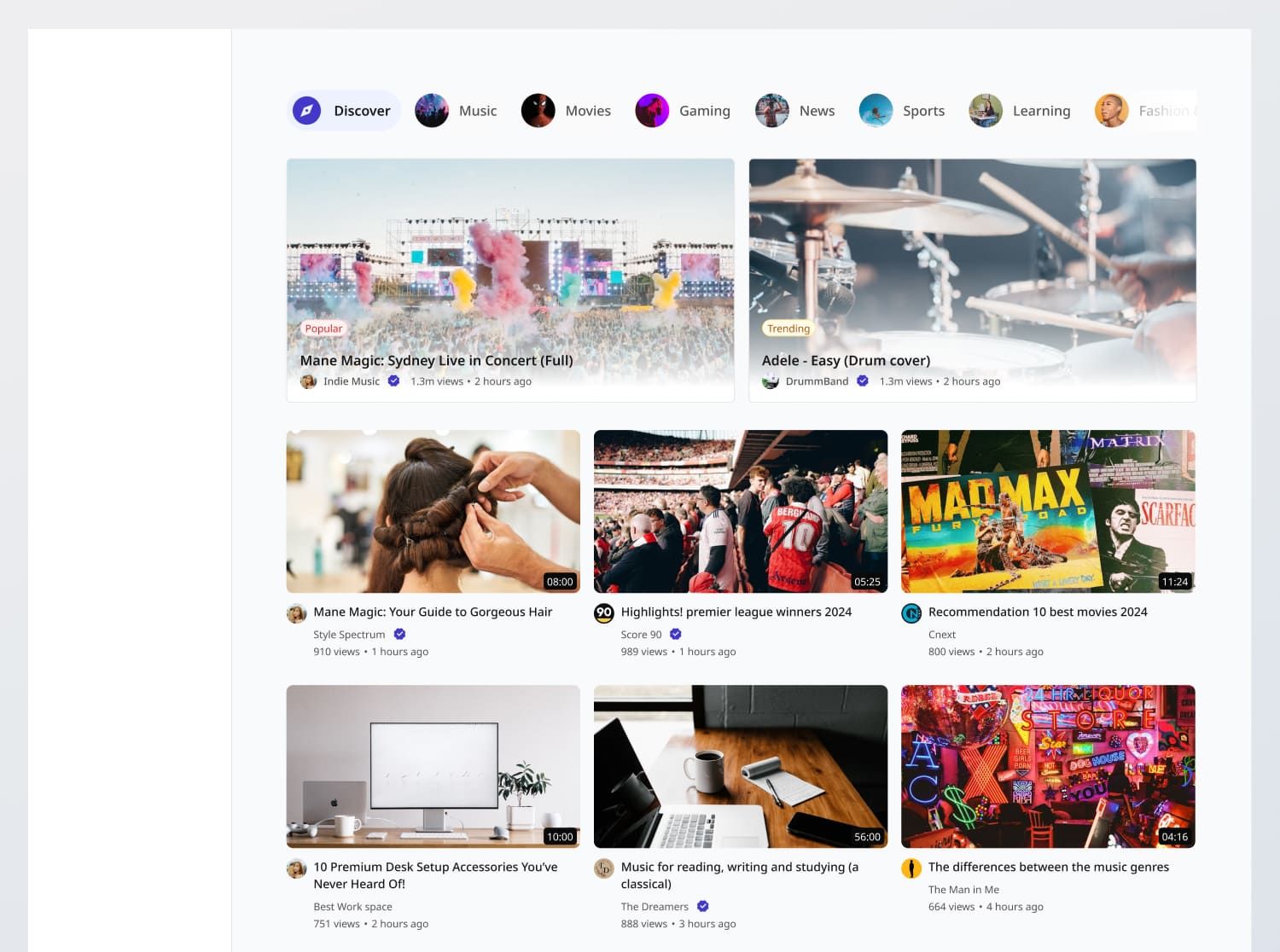
In this challenge, you are tasked with creating a fully functional, responsive video feed page that adheres to the design specifications provided. The interface should include the following features where users can:
- Browse a feed of recommended videos
- View different categories of videos
- Interact with video cards to access more details
- [Stretch goal] Use the YouTube API to fetch and display video data, including video details, thumbnails, and categories.
Functional Requirements
1. Video Feed
- Display a feed of recommended videos from the YouTube API
- If you did the Video Card challenge, integrate it for dynamic content display. Else, you can also build it directly in this challenge.
- Video title: Truncate long titles if needed, as per the design.
- Video duration: Display in MM:SS or HH:MM:SS format.
- Creator name: If the creator is verified, display a verification tick.
- Number of views: Conduct big number rounding and truncation e.g., 500,000 to 500K, 5,000,000 to 5M.
- Date created: Display in relative time format e.g., 5 months ago.
- On click: Clicking on the creator name should take the user to their channel. Clicking anywhere else leads to the Video Detail Page (You will build this in the MeTube challenge. For now, leave it as a placeholder).
- Display 2 special video cards at the top of the grid, which shows a popular video and a trending video in the current category
2. Categories
- Display a horizontal list of categories at the top of the page.
- Each category chip contains the image of one of the videos found in the category.
- Each category should be selectable, and upon selection, the video feed should update to show videos from that category.
3. [Stretch goal] YouTube API Integration
- Use the YouTube Data API to fetch and display video data, including video details, thumbnails, and categories.
4. Error States
- Data Fetch Error: Show an empty state message titled "Unexpected error" with the description "We're facing some issues at the moment. Please try again later or contact support."
General Requirements
- Design fidelity: Aim to follow the design as closely as possible. All elements in the design should be present, using the specified text color, font size, font weight, spacing, dimensions, etc.
- Responsive behavior:
- Text size: Should be responsive; font size is larger for wider devices, smaller for narrow devices.
- Responsive layout: The content should stack vertically on smaller screens and align horizontally as the screen width increases.
- Link / Button states: Implement and style links and buttons to reflect different states - normal, hover, focus and disabled.
- Pill tabs: Implement and style pill tabs to reflect different states - normal, hover and active.
- Cross-browser compatibility: Check that your solution works for major browsers including Chrome, Firefox, and Safari.
- [Stretch goal] Performance optimization: Code for fast load times with efficient CSS and JavaScript techniques.
- [Stretch goal] Accessibility and semantics: Follow best practices for web accessibility, such as using semantic HTML and ARIA roles where necessary and using proper
alttags for images.
1/3
Resources provided
Design files for desktop, tablet and mobile
High resolution image assets
README file
Starter code with content copy
Style guide for typography, colors and spacing
API specifications and sample data
Support you can expect
Official guides & resources
Development guides written & curated by Sr engineers at Big tech, such as:
Learn from good code
We recommend well-rated submissions using the same stack for your reference
Responsive solution built with React
React
Tailwind
Nextjs
Ask any questions in community
Have any doubts or need help? Ask in the community and discuss with others.
18
Anna Gilbert ·
Software Engineer @ Stripe
4 YOE