Project brief
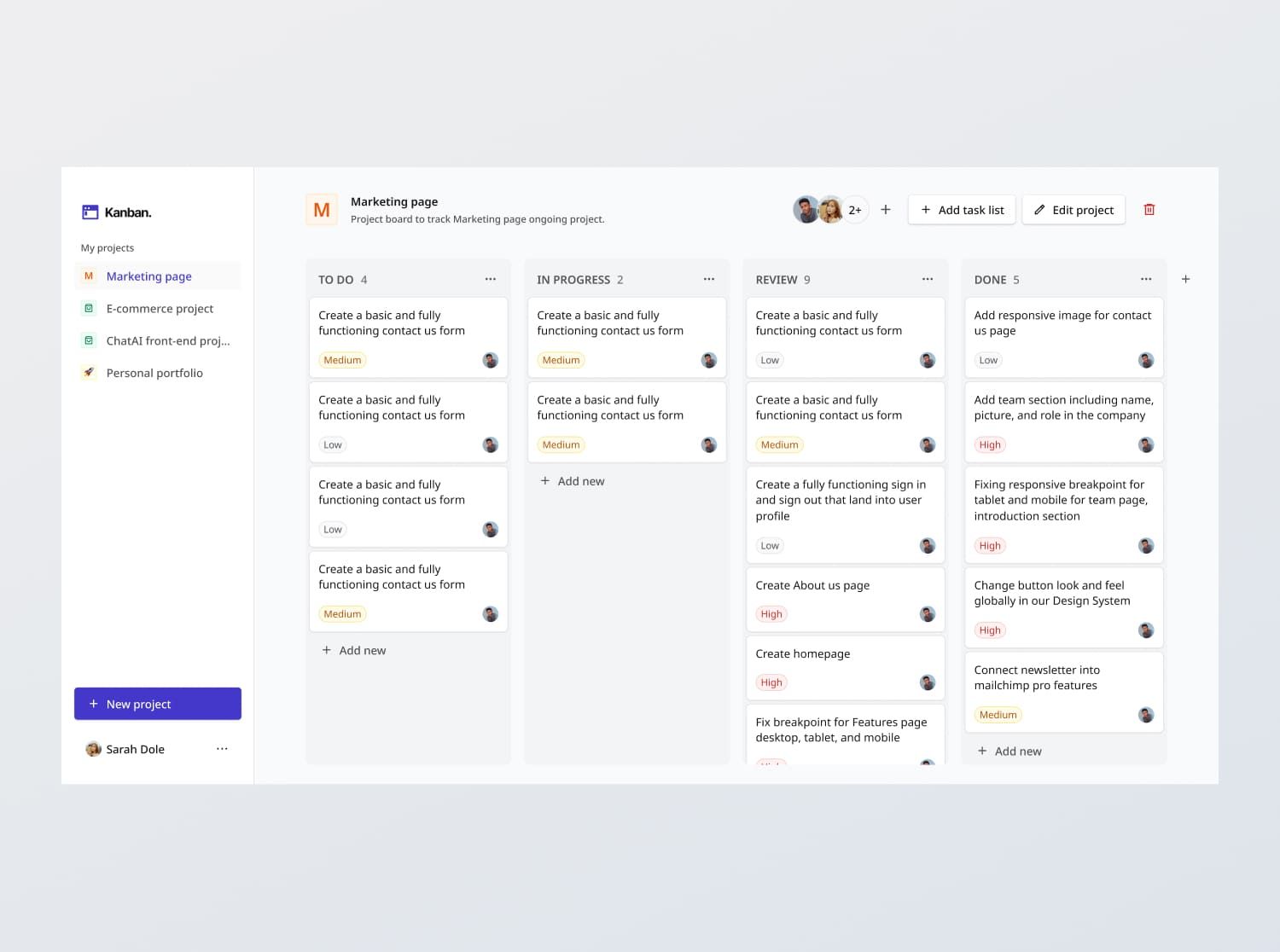
Kanban boards are project management tools that help users track the progress of projects. Each project is represented on a 'board' with tasks organized into lists based on their status (e.g., To Do, In Progress, Done). Users can easily move tasks between lists by dragging and dropping, facilitating seamless transitions between stages.
In this challenge, you are tasked with creating a fully functional, responsive Kanban board application that adheres to the design specifications provided in the Figma files. In summary, the interface should include the following features:
- Create, edit, delete: Project boards, task lists (i.e. task status) and tasks
- Assign attributes: Upon creating a board, task list or task, users should be able to assign attributes to each, which are dynamically displayed
- Drag and drop tasks: Tasks can be dragged and dropped into task lists
- [Stretch goal] Team: Users should be able to manage team for each project board and assign users to tasks
We will provide some read-only APIs with dummy users to support this project if you would like to focus on the front end. Alternatively, you can extend it to a full stack project by populating your own database.
Functional Requirements
1. Kanban board interface
- Projects boards:
- Each project is displayed as a board, with task lists containing tasks
- Projects can be
- Created (either from "Create project" screen that is shown when there are no projects, or from the "New project" button on the sidebar),
- Deleted
- Edited
- Project attributes include: Project icon (optional), Project name and a Project description (optional), Teammates
- When there are no projects yet, display the "Create project" screen and CTA
- Projects should be sorted by latest modified first on the sidebar
- Task lists:
- Contains tasks
- By default, there are 3 task lists by status - 'To Do', 'In Progress' and 'Done'
- Task lists can be created, deleted and edited (by renaming a task list)
- Task list attributes include: Name
- When there are no task lists yet, display the "Create task list" screen and CTA
- Tasks:
- Tasks can be created, deleted and edited
- Task attributes include: Task name, Task description, Priority (High level, Medium level, Low level) and List (that the task belongs to), Assignee
- User should be able to click on a task to view its full details, and edit the task
- When there are no tasks in a task list yet, display the empty state
- Drag and drop:
- Tasks should be draggable between lists and within a list (to change the relative order of tasks in a list).
- Task lists should be draggable between lists (to change the relative order of tasks lists in a board)
- Loading Indicator: Display a loading animation while fetching tasks or projects.
2. Team and assignees
- For simplicity,
- We assume that the Kanban board is for individual use (not organization), and each project board has a team of users (instead of sharing boards across an organization)
- Every user also has full editor access to a project they are part of, instead of a detailed access control by role
- [Stretch goal] For each project, users can invite new team mates to the project
- Team mates are invited by email. Multiple team mates can be added with a comma separating them
- Upon inviting, the user should receive an invitation email to join the project
- Upon accepting,
- If they do not already have an account, they will be asked to sign up first
- Else, the project will be added to their app and they will be able to see and edit the project
3. State persistence
- On loading each project's board, the board should reflect the latest task data fetched from the back end.
4. Handling states
- Data fetch error: Show an empty state message titled "Unexpected error" with the description "We're facing some issues at the moment. Please try again later or contact support at [email]."
- Empty states: Show the relevant states when there are no projects, to task lists, or no tasks
6. API integration
- [Stretch goal] Populate database: Design a database schema and populate a database with the given dummy data.
- [Stretch goal] Create and integrate with API endpoints: Build your own endpoints based on the database schema to fetch and store data.
- Else, build the front end app by integrating with the provided read-only APIs.
General Requirements
- Design fidelity: Aim to follow the design as closely as possible. All elements in the design should be present, using the specified text color, font size, font weight, spacing, dimensions, etc.
- Responsive behavior:
- Text size: Should be responsive; font size is larger for wider devices, smaller for narrow devices.
- Responsive layout: The content should stack vertically on smaller screens and align horizontally as the screen width increases.
- Adaptive hamburger menu: Hamburger menu should be implemented for tablet and mobile views. The menu should be shown once the hamburger icon button is tapped on.
- Interactivity:
- Link / Button states: Implement and style links and buttons to reflect different states - normal, hover, focus and disabled.
- Sidebar chips: Implement in Selected and Normal statues
- Input field states: Implement and style input fields to reflect different states - normal, focus filled, disabled, error, error filled, error focused.
- Cross-browser compatibility: Check that your solution works for major browsers including Chrome, Firefox, and Safari.
- [Stretch goal] Performance optimization: Code for fast load times with efficient CSS and JavaScript techniques.
- [Stretch goal] Accessibility and semantics: Follow best practices for web accessibility, such as using semantic HTML and ARIA roles where necessary and using proper
alttags for images.
Resources provided
Support you can expect
