Get started
While working on project
After completion
1/3
Project brief
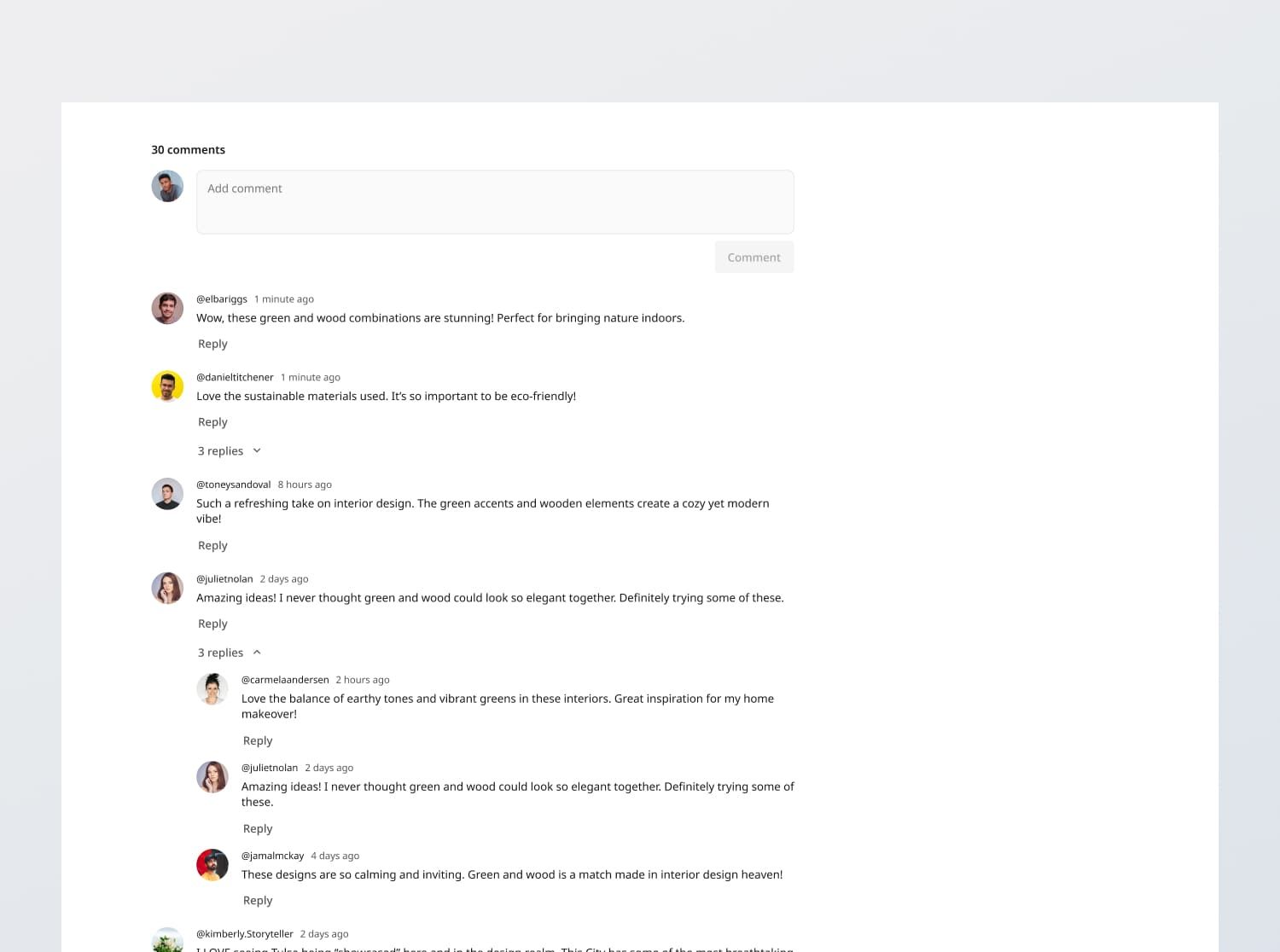
In this challenge, you are tasked with creating a fully functional, responsive discussion section component that adheres to the design specifications provided in the Figma files. In summary, the interface should support the following features:
- Standard comment functions: Allow users to create, view, reply to, edit and delete comments
- Nested comments: Support one level of nested comments for replies
- [Stretch goal] API integration: Create your own endpoints to fetch, display, and persist comments
Functional Requirements
1. Viewing comments
- Comment list: Show a list of comments, each with a user avatar, username, timestamp (in relative time format), and comment text
- Comment number: Include the number of comments on top of the list e.g. "30 comments"
- Default sorting: Latest created comment first
- Nesting: Support 1-level of nested comments for replies, allowing users to reply to both original comments and other replies.
- Toggle Functionality: Allow users to collapse and expand nested comment threads.
- Infinite scrolling: Dynamically load more comments as the user scrolls down, with each page consisting of 30 items (Desktop), 12 items (Tablet / Mobile).
- Loader: When loading comments asynchronously, implement a loader that appears while the data is still fetching (when fetching the initial list and when fetching data from infinite scroll)
2. Posting, Editing and Deleting comments
- Posting new comments:
- Include a comment box at the top of the comment section which allows users to post new comments
- Upon posting a comment, it should appear on the top of the list regardless of the current sort criteria. Only upon refresh should it be sorted with other comments.
- Replying to comments:
- Allow users to reply to comments with a 'Reply' button below the comment that triggers an input box
- Limit the nesting level to 1 i.e. You can reply to a top level comment, but subsequent replies to a second-level comment will not increase the level of nesting. It will however include the username of the person the user is replying to at the start of their comment.
- Editing and deleting comments:
- Users should be able to edit and delete comments they have posted
- Loader:
- When saving comments asynchronously, implement a loader upon posting, replying, editing, and deleting comments
3. [Stretch goal] API integration
- [Stretch goal] Populate database: Design a database schema and populate a database with the given dummy data
- [Stretch goal] Create and integrate with API endpoints: Build your own endpoints based on the database schema to fetch data and post new data.
- [Stretch goal] Submission: If you implement API endpoints, clicking "Comment" or "Save" to comment / reply / edit comment should submit the data to your API endpoint, handling responses and errors gracefully:
- Success feedback: Not required in this case, since commenting is a common occurrence
- Error response: Handle any API error responses (e.g., 400 Bad Request, 500 Internal Server Error) by displaying an appropriate message such as "Unexpected error" with the description "We're facing some issues at the moment. Please try again later or contact support."
4. State persistence
- On loading the discussion section, the comments should reflect the latest local state, or the latest backend state if you implement the API stretch goal.
5. Error states
- Data fetch error: Show an empty state message titled "Unexpected error" with the description "We're facing some issues at the moment. Please try again later or contact support."
General Requirements
- Design fidelity: Aim to follow the design as closely as possible. All elements in the design should be present, using the specified text color, font size, font weight, spacing, dimensions, etc.
- Responsive layout: The content should stack vertically on smaller screens and align horizontally as the screen width increases.
- Interactivity
- Link / Button states: Implement and style links and buttons to reflect different states - normal, hover, focus and disabled.
- Input field states: Implement and style input fields to reflect different states - normal, focus filled, disabled, error, error filled, error focused.
- Cross-browser compatibility: Check that your solution works for major browsers including Chrome, Firefox, and Safari.
- [Stretch goal] Performance optimization: Code for fast load times with efficient CSS and JavaScript techniques.
- [Stretch goal] Accessibility and semantics: Follow best practices for web accessibility, such as using semantic HTML and ARIA roles where necessary and using proper
alttags for images.
1/3
Resources provided
Design files for desktop, tablet and mobile
High resolution image assets
README file
Starter code with content copy
Style guide for typography, colors and spacing
Support you can expect
Official guides & resources
Development guides written & curated by Sr engineers at Big tech, such as:
Learn from good code
We recommend well-rated submissions using the same stack for your reference
Responsive solution built with React
React
Tailwind
Nextjs
Ask any questions in community
Have any doubts or need help? Ask in the community and discuss with others.
18
Anna Gilbert ·
Software Engineer @ Stripe
4 YOE